Video Statement
Objective
The Video Statement module necessitates users to read aloud pre-configured statements for authentication and verifies if the verbal input from the user match with the statements. It records a high resolution video of the user undergoing the verification process and additionally checks for liveness and face match.
It serves the following verifications:
- Verifies if the user's verbal input match the displayed statements,
- Ensures the user is distinctly visible and live which prevents fraudulent attempts using pre-recorded videos,
- Confirms that the same user completes the entire verification process.
| Input | Output |
|---|---|
| The pre-configured statement(s) for the verification process and the user's selfie | It indicates whether the user's verbal input matches the displayed statements, and provides the outcomes of the liveness and face match evaluations |
Benefits of the Video Statement module:
The following is a sample list of the advantages of using the module.
- Transition from agent-led VKYC to agent-less video KYC.
- User's confirmation of terms and conditions.
- User's confirmation of loan amount and interest details.
- Video-based OTP authentication.
- Retrieval of user's KYC details via voice input for enhanced verification.
The video recording feature should be enabled to support all the mentioned benefits.
Supported Configurations
| Configuration Option | Description |
|---|---|
| Verification Checks | Configure the specific verification checks to be performed for each of the statements. |
| Nature of Checks | Choose between two verification modes:
|
| Mandatory or non-mandatory checks | You can further configure a check as mandatory or non-mandatory.
|
| Language for Statements | The statement verification module supports multiple languages. |
| Statement Sequence | Define the sequence of statements for the verification process based on statement IDs. Configure the next verification statement in case of a verification failure. |
| Time Limit | Set time limits for users to complete each statement verification step. Tailor the time limit to accommodate longer statements and one-time passwords (OTPs). |
| Conditional Verification Statements | Customize verification statements to be displayed to specific user categories. |
| Instruction Pages | Create multiple instruction pages to guide users through the verification process. |
| Statement Restart Limit | Establish a limit on the number of times a user can restart the verification process for a statement. A restart is triggered when a user fails any of the configured verification checks. |
| Number of Verification Statements | Configure any number of verification statements for each user. This could also include a one-time-password (OTP) configured as a verification statement. |
Details
You can configure any statement as a part of the verification process.
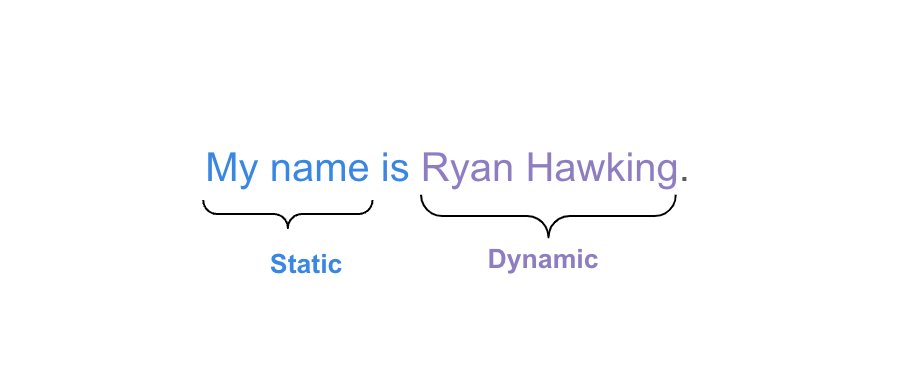
The statements are divided into two parts:
- Static - The part of the statement that remains fixed for all users.
- Dynamic - The part of the statement that is dependant on the user. For example, this can be the name of the user, or the principle and interest amount of a loan tailored for them.
The following image shows a sample statement with the static and dynamic part highlighted for your reference.
Sample Instruction
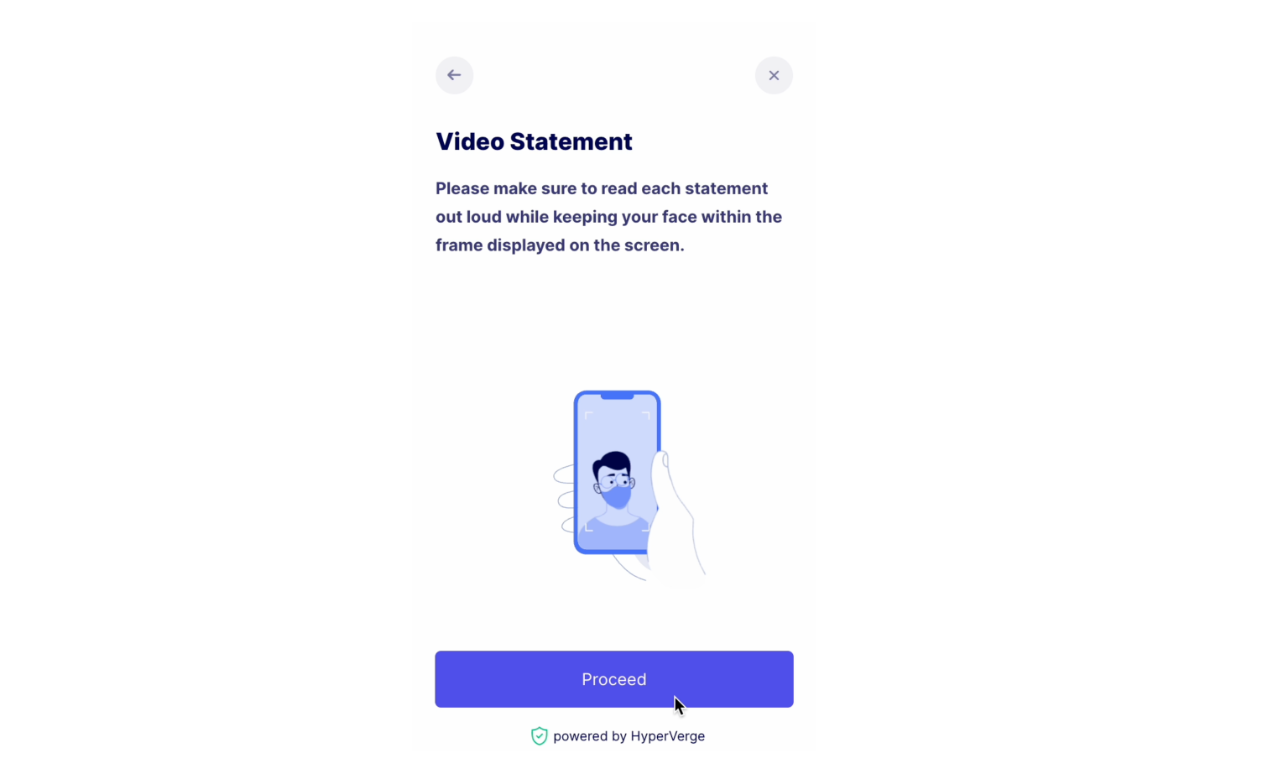
The following image shows a sample instruction page.
Best Practices
For the best results during the statement verification process, consider the following tips:
- Speak naturally and clearly, maintaining a consistent volume and tone.
- Avoid background noise and ensure a quiet environment during the verification process.
- Enunciate each word properly and adhere to the provided sentence structure.
Success Response Sample
The following code is a sample of a success response from the module.
{
  "moduleId": "module_video_statement",
  "apiResponse": {
    "status": 200,
    "details": {
      "videoRef": "9b32259c-2aa2-45aa-a75a-46db470bdfbf",
      "statements": [
        {
          "statementId": "id-0+0",
          "startTimestamp": "00:00:05",
          "endTimestamp": "00:00:13",
          "speechToTextMatching": {
            "results": {
              "match": "no"
            },
            "apiResponse": {
              "sttOutput": "castellon futbol24",
              "matchResult": {
                "match": false,
                "status": "SUCCESS!",
                "verbose": "R: CASTELlOn FUTBOLTWEnt**y* FOUR \nH: *JINA lAnGU NI JECInt NyAYIEKA \n\nSimilarity ratio: 0.18518518518518517\nDiff: [['CASTELlOn FUTBOLTWEnt**y* FOUR', '*JINA lAnGU NI JECInt NyAYIEKA']]\nSimilarity too low !!\nR: **Ca*STELLOn* ***FUt****BOL24 \nH: JINa LANGU nI JECINt NYAYIEKA \n\nSimilarity ratio: 0.16666666666666666\nDiff: [['**Ca*STELLOn*', 'JINa LANGU nI'], ['***FUt****BOL24', 'JECINt NYAYIEKA']]\nSimilarity too low !!\n"
              }
            }
          },
          "faceDetection": {
            "results": {
              "inFrame": "yes"
            }
          },
          "liveness": {
            "results": {
              "live": "yes"
            },
            "apiResponse": {
              "status": "success",
              "statusCode": 200,
              "metadata": {
                "requestId": "1694097262527-6d1c99f0-5fc4-49c3-8f2d-12c07f311bd5",
                "transactionId": "PP41734130"
              },
              "result": {
                "details": {
                  "liveFace": {
                    "value": "yes",
                    "confidence": "high"
                  }
                },
                "inputImageUrls": {
                  "image": "<Image_URL>"
                },
                "summary": {
                  "action": "pass",
                  "details": []
                }
              }
            },
            "image": "<Image_URL>"
          },
          "statementText": "Jina langu ni Jecinter Nyayieka.",
          "speechToText": "castellon futbol24"
        },
        {
          "statementId": "id-1+0",
          "startTimestamp": "00:00:13",
          "endTimestamp": "00:00:22",
          "speechToTextMatching": {
            "results": {
              "match": "no"
            },
            "apiResponse": {
              "sttOutput": "because the customer behavior",
              "matchResult": {
                "match": false,
                "status": "SUCCESS!",
                "verbose": "R: BECa***u*****S **t**********h*e** Cu****Sto*M BEHAViOR \nH: NINaNUNuA BOOM KUtOKA KWA OChIeNG OuMA KUtoKA SUN KiNG \n\nSimilarity ratio: 0.15384615384615385\nDiff: [['BECa***u*****S', 'NINaNUNuA BOOM'], ['**t**********h*e**', 'KUtOKA KWA OChIeNG'], ['Cu****Sto*M', 'OuMA KUtoKA'], ['BEHAViOR', 'SUN KiNG']]\nSimilarity too low !!\n"
              }
            }
          },
          "faceDetection": {
            "results": {
              "inFrame": "yes"
            }
          },
          "liveness": {
            "results": {
              "live": "yes"
            },
            "apiResponse": {
              "status": "success",
              "statusCode": 200,
              "metadata": {
                "requestId": "1694097268465-7fad874e-f94d-4bb4-a062-0bd29558ec0b",
                "transactionId": "PP41734130"
              },
              "result": {
                "details": {
                  "liveFace": {
                    "value": "yes",
                    "confidence": "high"
                  }
                },
                "inputImageUrls": {
                  "image": "<Image_URL>"
                },
                "summary": {
                  "action": "pass",
                  "details": []
                }
              }
            },
            "image": "<Image_URL>"
          },
          "faceMatch": {
            "results": {
              "match": "yes"
            },
            "apiResponse": {
              "status": "success",
              "statusCode": 200,
              "metadata": {
                "requestId": "1694097270621-8d271f70-dfb5-4503-9d15-b2b07361d7a9",
                "transactionId": "PP41734130"
              },
              "result": {
                "details": {
                  "match": {
                    "value": "yes",
                    "confidence": "high"
                  }
                },
                "inputImageUrls": {
                  "image1": "<Image_URL_1>",
                  "image2": "<Image_URL_2>"
                },
                "summary": {
                  "action": "pass",
                  "details": []
                }
              }
            },
            "image": "<Image_URL>",
            "image2": "<Image2_URL>"
          },
          "statementText": "Ninanunua Boom kutoka kwa Ochieng Ouma kutoka Sun King.",
          "speechToText": "because the customer behavior"
        },
        {
          "statementId": "id-2+0",
          "startTimestamp": "00:00:22",
          "endTimestamp": "00:00:40",
          "speechToTextMatching": {
            "results": {
              "match": "no"
            },
            "apiResponse": {
              "sttOutput": "",
              "matchResult": {
                "match": false,
                "status": "FAILURE: Text Unicode Error!",
                "verbose": null
              }
            }
          },
          "faceDetection": {
            "results": {
              "inFrame": "yes"
            }
          },
          "liveness": {
            "results": {
              "live": "yes"
            },
            "apiResponse": {
              "status": "success",
              "statusCode": 200,
              "metadata": {
                "requestId": "1694097277953-fec524ef-3d2f-492e-8c7d-00bc78f7d5ed",
                "transactionId": "PP41734130"
              },
              "result": {
                "details": {
                  "liveFace": {
                    "value": "yes",
                    "confidence": "high"
                  }
                },
                "inputImageUrls": {
                  "image": "<Image_URL>"
                },
                "summary": {
                  "action": "pass",
                  "details": []
                }
              }
            },
            "image": "<Image_URL>"
          },
          "faceMatch": {
            "results": {
              "match": "yes"
            },
            "apiResponse": {
              "status": "success",
              "statusCode": 200,
              "metadata": {
                "requestId": "1694097280227-543a4c3b-21b8-44ac-806c-6240b47c7a5f",
                "transactionId": "PP41734130"
              },
              "result": {
                "details": {
                  "match": {
                    "value": "yes",
                    "confidence": "high"
                  }
                },
                "inputImageUrls": {
                  "image1": "<Image_URL>",
                  "image2": "<Image_URL>"
                },
                "summary": {
                  "action": "pass",
                  "details": []
                }
              }
            },
            "image": "<Image_URL>",
            "image2": "<Image_URL>"
          },
          "statementText": "Bidhaa yangu inakuja na Taa yenye Radio, Stand ya Chuma, Sola ya Jua na Pini Tatu za Kuchaji simu zenye kebo ya USB.",
          "speechToText": ""
        }
      ],
      "images": {}
    }
  },
  "attempts": "1",
  "previousAttempts": []
}
Success Response Details
| Object | Field | Description |
|---|---|---|
| apiResponse | status | The API response status is 200, indicating a successful request. |
| apiResponse | details | Additional details about the analysis, including video reference and statements. |
| apiResponse.details | videoRef | An identifier for the analyzed video. |
| apiResponse.details | statements | An array of individual statements within the video. |
| apiResponse.details.statements | statementId | A unique identifier for each statement in the video. The identifier's value also involves two parts separated by the "+" symbol. The first part (before the "+") represents the unique statement ID. The second part of the identifier (following the "+") represents the count of the attempt for this particular statement ID in the verification process. For example, the statement ID in the response is "id-0+0", where "id-0" represents the unique statement identifier whereas the "+0" represent that first attempt for this statement. Similarly, the second attempt at verification using this statement will have "id-0+1" as the identifier. |
| apiResponse.details.statements | startTimestamp | The start time of the statement in the video (e.g., "00:00:05"). This parameter along with the endTimestamp parameter can be used to identify the part of the video where the customer undergoes the statement verification process. |
| apiResponse.details.statements | endTimestamp | The end time of the statement in the video (e.g., "00:00:13"). This parameter along with the startTimestamp parameter can be used to identify the part of the video where the customer undergoes the statement verification process. |
| apiResponse.details.statements | speechToTextMatching | Information about speech-to-text matching for the statement. |
| apiResponse.details.statements.speechToTextMatching | results | Indicates whether there was a match or not for speech-to-text. |
| apiResponse.details.statements.speechToTextMatching | apiResponse | Additional details about the speech-to-text analysis. note This apiResponse object and its parameters are optionally displayed depending on your configuration preferences. |
| apiResponse.details.statements.speechToTextMatching.apiResponse | sttOutput | The speech-to-text(STT) output reflects what the module captured and converted to text from the user's spoken inputs for a verification statement. |
| apiResponse.details.statements.speechToTextMatching.apiResponse | matchResult | Details about the match status, status message, and similarity information. |
| apiResponse.details.statements | faceDetection | Indicates whether a face was detected in the statement. |
| apiResponse.details.statements | liveness | Indicates whether the face detected appears to be live. |
| apiResponse.details.statements.liveness.apiResponse | status | The status of liveness detection is "success" with a statusCode of 200. |
| apiResponse.details.statements.liveness.apiResponse | metadata | Metadata containing requestId and transactionId. |
| apiResponse.details.statements.liveness.apiResponse.result.details.liveFace | value | Indicates that the face is live with high confidence. |
| apiResponse.details.statements.liveness.apiResponse.result.details.liveFace | confidence | High confidence in live face detection. |
| apiResponse.details.statements.liveness.apiResponse | inputImageUrls | Input image URLs for liveness detection. |
| apiResponse.details.statements.liveness.apiResponse.summary | action | The action is "pass," indicating successful liveness detection. |
| apiResponse.details.statements | faceMatch | Indicates whether the face detected matches a reference face. |
| apiResponse.details.statements.faceMatch.apiResponse | status | The status of face matching is "success" with a statusCode of 200. |
| apiResponse.details.statements.faceMatch.apiResponse.metadata | requestId | Request identifier for face matching. |
| apiResponse.details.statements.faceMatch.apiResponse.metadata | transactionId | Transaction identifier for face matching. |
| apiResponse.details.statements.faceMatch.apiResponse.result.details.match | value | Face match result is "yes" with high confidence. |
| apiResponse.details.statements.faceMatch.apiResponse.result.details.match | confidence | High confidence in face matching. |
| apiResponse.details.statements.faceMatch.apiResponse | inputImageUrls | Input image URLs for face matching. |
| apiResponse.details.statements | statementText | The text extracted from the statement. |
| apiResponse.details.statements | speechToText | The text obtained from the speech-to-text analysis. |
| apiResponse.details.statements | faceDetection | Indicates whether a face was detected in the statement. |
| apiResponse.details.statements | liveness | Indicates whether the face detected appears to be live. |
| apiResponse.details.statements | faceMatch | Indicates whether the face detected matches a reference face. |
| attempts | Indicates the number of attempts made for this analysis. | |
| previousAttempts | An array that contains information about previous attempts. |